For two years I copy-pasted nginx configs without actually knowing what nginx was doing. proxy_pass http://localhost:3000 — sure, it works, ship it. But every time something broke in prod, I was guessing. I had no mental model of what happened between a client request arriving and my Express app receiving it.
So I spent an afternoon building a tiny reverse proxy in Node.js. About 40 lines. And now nginx config files make complete sense to me.
Here’s what I built and what broke my brain along the way.
Forward Proxy vs. Reverse Proxy (One Paragraph, I Promise)
A forward proxy sits in front of clients. You configure your browser to route through it. It hides who you are.
A reverse proxy sits in front of servers. Clients don’t know it exists. Think of it like a hotel front desk: guests ask for things, the desk routes requests to housekeeping, engineering, room service — guests never interact with any of them directly.
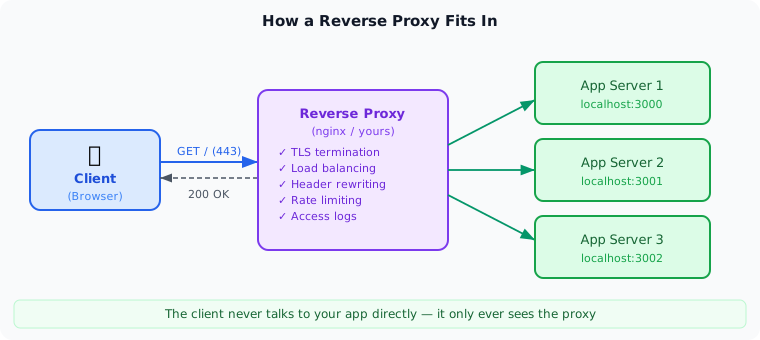
When nginx sits between your users and your Node app, it’s the front desk. Clients talk to nginx on 443. nginx forwards to your app on 3000. Your app doesn’t touch TLS, rate limiting, or load balancing. That’s nginx’s problem.
The Core Mechanism
Three things happen on every request:
- Client connects to the proxy
- Proxy opens a new connection to the upstream and forwards the request
- Upstream’s response streams back through the proxy to the client
That’s it. The proxy is a pipe with some intelligence bolted on. Let’s build the pipe first.
Step 1: The Skeleton
Node’s built-in http module is all you need.
const http = require('http');

const UPSTREAM = { host: 'localhost', port: 3000 };

const proxy = http.createServer((clientReq, clientRes) => {
  const options = {
    host: UPSTREAM.host,
    port: UPSTREAM.port,
    path: clientReq.url,
    method: clientReq.method,
    headers: clientReq.headers,
  };

  const upstreamReq = http.request(options, (upstreamRes) => {
    clientRes.writeHead(upstreamRes.statusCode, upstreamRes.headers);
    upstreamRes.pipe(clientRes);
  });

  clientReq.pipe(upstreamReq);
});

proxy.listen(8080, () => console.log('Proxy on :8080'));
Point your upstream at any HTTP server on port 3000, hit localhost:8080, and you’ll get the response. Works immediately.
But there are two bugs hiding in here.
Step 2: Fix the Headers
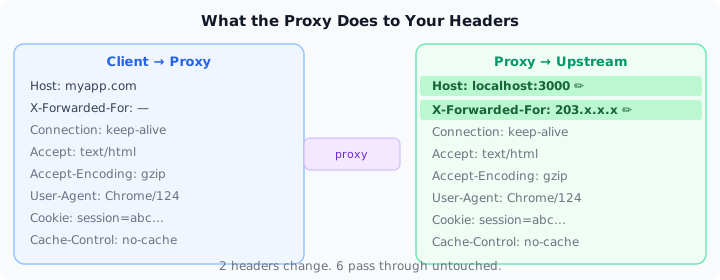
The upstream server receives a Host header that says localhost:8080 — the proxy’s address. Most servers use Host for routing (virtual hosting especially). You need to rewrite it.
You also lose the client’s real IP. When your app logs requests or runs rate limiting, it sees the proxy’s address, not the actual caller. X-Forwarded-For carries the real IP forward.
const options = {
  host: UPSTREAM.host,
  port: UPSTREAM.port,
  path: clientReq.url,
  method: clientReq.method,
  headers: {
    ...clientReq.headers,
    host: `${UPSTREAM.host}:${UPSTREAM.port}`,
    'x-forwarded-for': clientReq.socket.remoteAddress,
  },
};
Every time you write proxy_set_header X-Real-IP $remote_addr in an nginx config, this is what you’re doing. Two lines. That’s it.
Step 3: Handle Failures
If the upstream is down, the proxy just hangs. Bad. Add a timeout and proper error handling:
upstreamReq.setTimeout(5000, () => {
  upstreamReq.destroy();
  clientRes.writeHead(504);
  clientRes.end('Gateway Timeout');
});

upstreamReq.on('error', () => {
  if (!clientRes.headersSent) {
    clientRes.writeHead(502);
    clientRes.end('Bad Gateway');
  }
});

clientReq.on('error', () => upstreamReq.destroy());
502 Bad Gateway. 504 Gateway Timeout. You’ve seen those errors your whole career. Now you know exactly what produces them — the proxy couldn’t reach upstream, or upstream took too long to respond.
What Actually Clicked When I Built This
Streaming is the whole point. upstreamRes.pipe(clientRes) doesn’t buffer anything. Chunks flow through as they arrive. This is why nginx can proxy a 2GB file download without loading it into RAM. When you do res.end(body) instead, you’re breaking this for large responses.
Headers make two round trips. Request headers travel client → proxy → upstream. Response headers go upstream → proxy → client. The proxy can read and modify both directions on every request. This is how auth middleware, request tracing, and rate limiting work at the infra layer — not in your app code.
Two independent TCP connections. Client-to-proxy is one connection. Proxy-to-upstream is a completely separate one. The proxy can pool upstream connections (keep-alive) and reuse them across multiple client requests. That’s a big reason proxies improve throughput under load.
Forget Host rewriting once, debug for an hour. Virtual hosting — one server, multiple domains — relies entirely on the Host header. If you proxy without rewriting it, requests land on the wrong virtual host and you’ll spend forever staring at a 404 wondering why your logs show the right path.
Where to Take It Next
The toy above is ~40 lines. Production proxies like nginx, Caddy, and Traefik add:
Load balancing — pick which upstream to forward to (round-robin, least-connections, random). In the toy, this is just smarter logic for choosing UPSTREAM.
Health checks — stop routing to upstreams that don’t respond to GET /health. Poll on an interval, pull them from rotation when they fail.
TLS termination — wrap your proxy in https.createServer with a cert, forward plain HTTP to upstream. This is what “terminate TLS at the edge” means.
Connection pooling — keep upstream TCP connections alive and reuse them instead of re-opening per request. Big throughput win under load.
Circuit breaking — if an upstream fails repeatedly in a window, stop sending traffic to it entirely for a cooldown period.
Each one of these is a standalone mechanism you can layer onto this skeleton. Once you’ve built the toy, reading nginx’s config docs or Caddy’s reverse proxy middleware stops feeling like black magic and starts feeling like options.
Every tool you stop treating as magic becomes a tool you can actually trust.